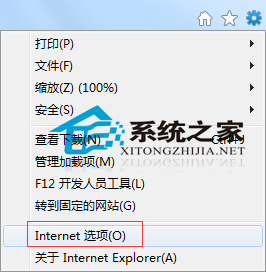
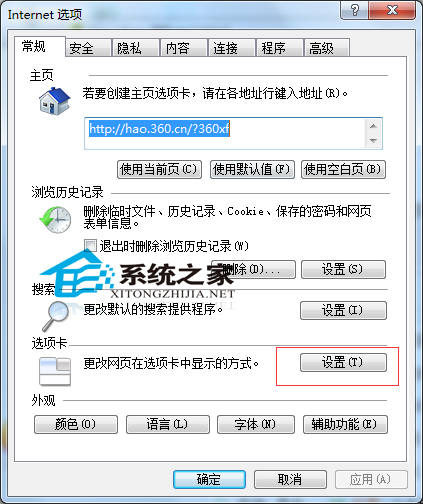
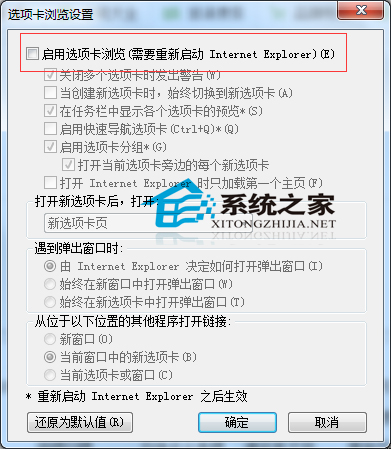
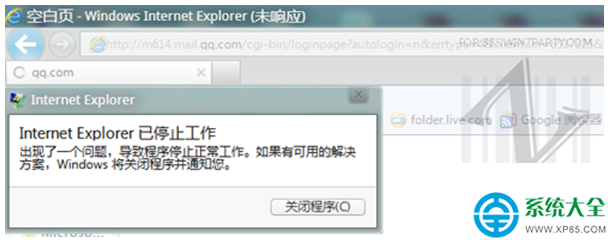
IE 預設分頁瀏覽易誤關整視窗。取消啟用分頁瀏覽可強制單視窗模式。
適合習慣單視窗操作、怕誤關分頁的用戶。
Opera 10.50 正式版發布:Carakan JS 引擎+Vega 圖形庫打造最快 Windows 瀏覽器,隱私模式支援單分頁隔離
《看門狗 2》破解版 v1.07 進不去遊戲?封鎖 EAC 與遊戲程式網路連線即解
Win7 行動硬碟分區打不開?磁碟管理重建分區表解決
360 打補丁後進不了系統?安全模式卸載更新或系統還原雙保險
Windows 7 顯示已知副檔名設定:避免雙重副檔名詐騙與誤判檔案類型
Win7 操作檔案提示「需要管理員權限」?兩招輕鬆解決權限不足
新電腦開啟攝影機提示「沒有視訊擷取硬體」怎麼辦?確認硬體存在、驅動正確、服務啟用三步驟排查
Win7 使用 NT6 HDD Installer 安裝 Win10 完整圖文教學