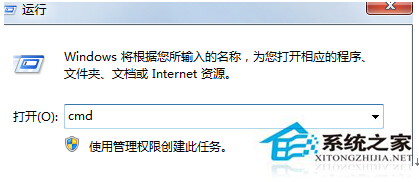
磁碟重組前檢查失敗,通常因檔案系統被鎖定。用 CMD 排程下次重開機修復,或進安全模式執行完整修復。
cmd
for %i in (c d e f g h) do chkdsk %i: /f
chkdsk C: /F /R
適用所有 Win7 版本,徹底解決「檢查無法執行」阻礙重組問題。
Win7运行程序频繁弹防火墙安全警报?禁用安全中心服务一劳永逸
Win7 安裝後必做 15 項優化:從視覺效果到虛擬記憶體全攻略
Win7 開啟 GIF 動圖,用 IE 瀏覽器預覽或設為預設程式播放動畫
Win7 Daemon Tools Lite 虛擬光碟機完整使用教學:掛載 ISO、建立虛擬光碟、卸載
Win7 解決程式回應失敗導致死機的登錄檔修正法
Win7 定時開機設定步驟詳解:BIOS 設定 RTC Alarm 喚醒電腦
Win7 退出家庭群組教程:解除電腦共享連結
Win7 如何開啟 SNMP 協定 161 連接埠?Windows 防火牆新增輸入規則