Windows XP Windows 7 Windows 2003 Windows Vista Windows 綜合教學 Linux 系統教學
Windows 10 Windows 8 Windows 2008 Windows NT Windows Server 電腦軟體教學

Win7 更新失敗錯誤 80070020?安全模式帶網路進行更新安裝

編輯:Win7 系統應用技巧

Windows Update 安裝失敗出現 80070020 (檔案被佔用/衝突),嘗試在「帶網路連線的安全模式」下執行更新,可避開第三方軟體/服務干擾,順利完成安裝。

安全模式更新步驟

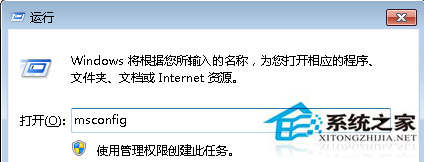
  1. Win + R 輸入 msconfig → 「開機」頁籤。
  2. 勾選「安全開機」 → 選「網路」 → 確定 → 重新開機。
  3. 進入安全模式 (帶網路) 後,執行 Windows Update 檢查並安裝更新。
  4. 安裝完成後,再次開啟 msconfig 取消勾選「安全開機」,重開機回正常模式。

msconfig 安全開機設定

若安全模式仍失敗,嘗試重置 Windows Update 元件:管理員 CMD 依序執行 net stop wuauserv, net stop bits, ren %systemroot%\SoftwareDistribution SoftwareDistribution.old, net start wuauserv, net start bits。

Copyright © Windows教程網 All Rights Reserved