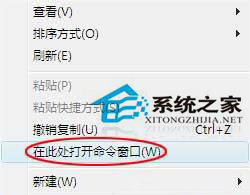
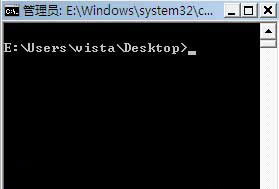
在資料夾中按住 Shift 鍵並點擊滑鼠右鍵,選單會出現「在此處開啟命令視窗」,直接以該資料夾為工作目錄開啟 CMD,比 Win+R 輸入 cmd 再 cd 切換路徑快速許多。
cmd
cd
注意:此法開啟的 CMD 權限為一般使用者。若需系統管理員權限,仍需從開始選單「命令提示字元」右鍵選「以系統管理員身分執行」。
Win7共享文件夹设置完全控制权限:高级共享权限配置允许修改删除文件
Win7 IE 瀏覽器固定網頁字體大小:忽略網頁指定字號,告別頻繁縮放
Win7 如何查看 Aero 特效佔用記憶體大小?其實只有幾十 MB
Windows 7 十大優化技巧:磁碟重組、IE 加速、工作列修復、系統還原等實戰招式
Win7 網頁右下角彈窗廣告怎麼關?IE 禁用腳本 + 毒霸廣告過濾雙重防護
Win7 透過群組原則禁止存取控制台保護電腦設定
Win7 裝置管理員在哪?三種快速開啟方法圖文教學
Win7 開機自動開啟瀏覽器並提示登入?群組原則啟用「關閉 Windows 網路連線狀態指示器活動測試」即可停用