BIOS 內建「開機區病毒保護」可防範開機區病毒 (Boot Sector Virus) 感染主開機記錄 (MBR)。啟用此功能為系統增加底層防線。
啟用步驟
- 重開機,開機畫面出現時連續按 Del (或 F2, F10, Esc 視主機板/筆電品牌) 進入 BIOS 設定畫面。
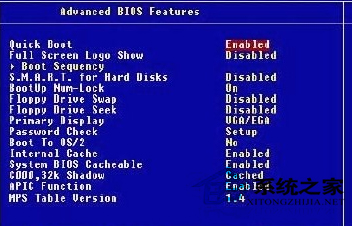
- 尋找 Security (安全) 或 Advanced (進階) 分頁 → 找到 Boot Sector Virus Protection (開機區病毒保護) → 設為 Enabled (啟用)。
- 按 F10 Save & Exit → 確定重開機。
注意: 此功能僅防範傳統開機區病毒 (感染 MBR/DBR),**無法替代作業系統層面的防毒軟體** (即時掃描、惡意軟體查殺、勒索軟體防護等)。請視為輔助防線,務必安裝主動防毒軟體。