Windows XP Windows 7 Windows 2003 Windows Vista Windows 綜合教學 Linux 系統教學
Windows 10 Windows 8 Windows 2008 Windows NT Windows Server 電腦軟體教學

Win7 播放 AVI 提示「xvidcore.dll not found」?下載 DLL 放入 System32 並註冊即可修復

編輯:Win7 系統應用技巧

播放 AVI 影片跳出 xvidcore.dll not found,代表缺少 Xvid 解碼器核心動態連結庫。補齊檔案並註冊即可解決。

修復步驟

  1. 下載 xvidcore.dll(請從可信來源取得)。
  2. 解壓縮至 C:\Windows\System32(64 位元系統另建議同步放入 C:\Windows\SysWOW64)。
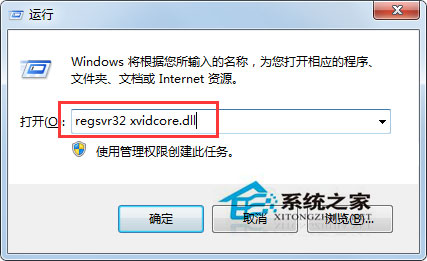
  3. Win+R → regsvr32 xvidcore.dll → 確定註冊成功。
  4. 重新播放 AVI 驗證。

xvidcore.dll 錯誤畫面

regsvr32 註冊指令

建議直接安裝 K-Lite Codec Pack 或 Xvid 解碼器 完整包,一次解決所有影音編碼缺失問題,避免手動註冊多個 DLL。

Copyright © Windows教程網 All Rights Reserved