任務管理員常見 mrt.exe,完整路徑 C:\Windows\System32\mrt.exe,為 Microsoft「惡意軟體移除工具(Malicious Software Removal Tool)」元件,隨 Windows Update 定期更新,掃描常見惡意程式。非病毒、非木馬,屬官方安全元件。
若電腦已安裝第三方防毒軟體,mrt.exe 屬重複防護,佔用記憶體與 CPU。可採取下列方式移除:
mrt.exe 程序。C:\Windows\System32\mrt.exe 檔案。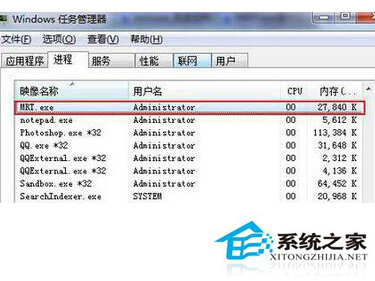
注意:移除後 Windows Update 可能再次推送該工具,若不想重複安裝,可在 Windows Update 設定中隱藏該更新。
Win7 Print Spooler 服務自動停止怎麼辦?啟用服務與排查安全軟體優化
Windows 7 安裝 Office 2013 錯誤 1603/1902 解決方案:Windows Event Log 與 Font Cache 服務權限修復
GMR 香港高寶金融集團支援什麼設備?蘋果、安卓、平板、電腦全平台覆蓋
Win7 攝影機黑屏/無法使用?更新 USB 視訊裝置驅動程式修復
Win7 網頁報錯「無法解析伺服器 DNS 位址」?刷新 DNS 快取與重設 Winsock
Win7 10 大实用优化技巧:碎片整理并行加速、IE插件排查、任务栏小工具修复、Alt+Tab分组切换、资源监视器...(含命令行参数)