Windows XP Windows 7 Windows 2003 Windows Vista Windows 綜合教學 Linux 系統教學
Windows 10 Windows 8 Windows 2008 Windows NT Windows Server 電腦軟體教學

Win7 如何合併磁碟分區?磁碟管理壓縮卷與擴展卷圖文教學

編輯:Win7 系統應用技巧

重裝系統後覺得 C 槽太小、D 槽太大?Win7 內建「磁碟管理」可在不重裝、不丟失資料 (壓縮源磁碟有足夠剩餘空間前提) 下,將 D 槽壓縮釋放未配置空間,再擴展 C 槽合併,實現無損調整分區大小。
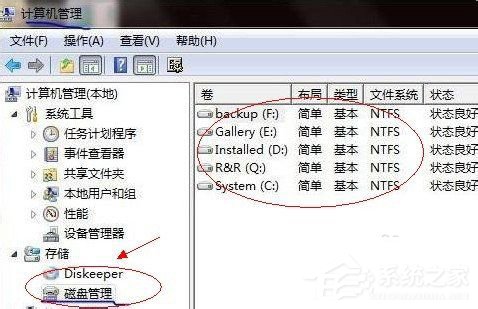
操作步驟

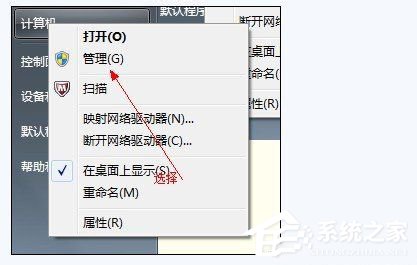
  1. 右鍵「電腦」/「我的電腦」→「管理」→「磁碟管理」。
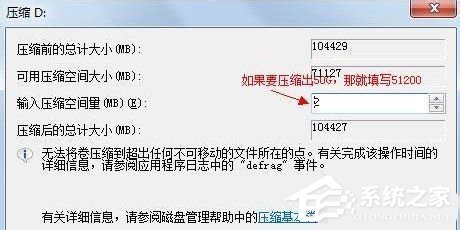
  2. 右鍵要壓縮的分區 (如 D:) →「壓縮卷」→ 輸入壓縮空間 (MB)。
    例:要騰出 50GB → 50 × 1024 = 51200 MB → 輸入 51200 →「壓縮」。
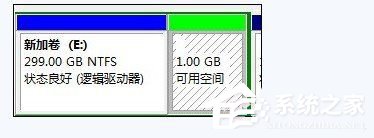
  3. 出現綠色「未配置」空間。
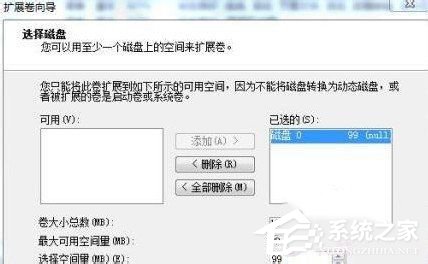
  4. 右鍵要擴展的分區 (如 C:) →「擴展卷」→ 精靈選擇未配置空間 → 下一步 → 完成。

限制:只能將「未配置」空間合併到「緊鄰左側」的分區 (C: 擴展需未配置空間在 C: 右側)。若中間隔著其他分區/擴充分區,需第三方工具 (如 DiskGenius、Partition Assistant) 移動分區位置後再擴展。

Copyright © Windows教程網 All Rights Reserved