Win7 內建大量功能 (列印/Windows Search/IE/Windows Media Player/平板電腦/虛擬機平台…),依實際需求關閉未用功能,減少攻擊面、釋放資源、加快啟動。
操作路徑
- 控制台 →「程式」→「程式和功能」。
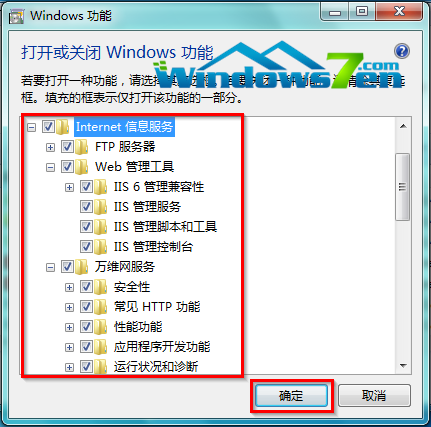
- 左側「開啟或關閉 Windows 功能」。
- 滑鼠懸停功能名稱 → 顯示說明工具提示。
- 取消勾選不需功能 → 確定 → 系統自動套用 (可能需重開機)。
常見可關閉功能 (視需求)
- 列印與文件服務: 無印表機/不共用列印。
- Windows Search: 習慣第三方搜尋/資料夾少。
- Internet Explorer: 全用 Chrome/Edge/Firefox。
- Windows Media Player / Media Center: 用 PotPlayer/VLC/MPC-BE。
- 平板電腦電腦元件: 無觸控螢幕/手寫板。
- Windows PowerShell 2.0: 不寫腳本/舊版相容無需求 (Win7 內建 2.0,系統核心功能不建議關)。
- 虛擬機器平台 / Hyper-V: 不跑虛擬機 (專業/旗艦版才有)。
原則
- **不確定功能用途 → 保留**,避免系統/軟體相依性中斷。
- 需求變更隨時可回來勾選恢復,無需重裝。
- 多人共用電腦 → 為他人建立標準帳戶,而非關閉功能限制權限。