Windows XP Windows 7 Windows 2003 Windows Vista Windows 綜合教學 Linux 系統教學
Windows 10 Windows 8 Windows 2008 Windows NT Windows Server 電腦軟體教學

Win7 32位元 CMD 提示「不是內部或外部命令」?修復 PATH 環境變數即可

編輯:Windows 7 系統介紹

Win7 32位元系統在 CMD 輸入任何指令都提示「不是內部或外部命令」,主因是系統環境變數 Path 或 windir 遺失/錯誤,導致系統找不到 C:\Windows\System32 下的執行檔。

方法一:透過「執行」暫時修復 Path

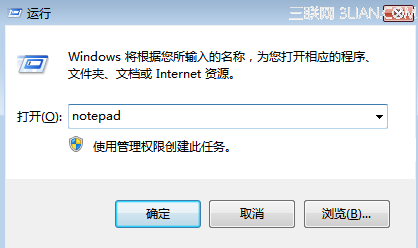
  1. 按 Win+R 開啟「執行」。
  2. 輸入:path %windir%\system32 → 確定。
  3. 重新開機測試。

執行修復 Path 指令

方法二:永久修復環境變數(根本解決)

  1. 右鍵「電腦」→「內容」→「進階系統設定」。
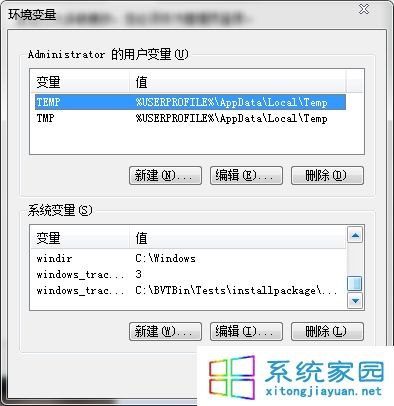
  2. 「進階」索引標籤 → 「環境變數」。
  3. 在「系統變數」區塊找到 Path,編輯確認包含 %SystemRoot%\system32;%SystemRoot%;%SystemRoot%\System32\Wbem 等關鍵路徑。
  4. 檢查 windir 變數值是否為 C:\Windows(或系統安裝目錄),錯誤則修正,不存在則新增。
  5. 確定所有視窗,重新開機。

環境變數編輯視窗

原因分析:優化軟體、惡意程式、或手動誤刪環境變數均可能導致此問題。修復後建議掃毒並檢查啟動項,防止再次發生。

Copyright © Windows教程網 All Rights Reserved