插入 USB、光碟時自動播放或詢問動作,可透過「預設程式」自訂各裝置的自動播放行為。
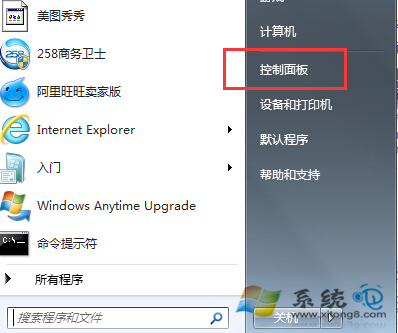
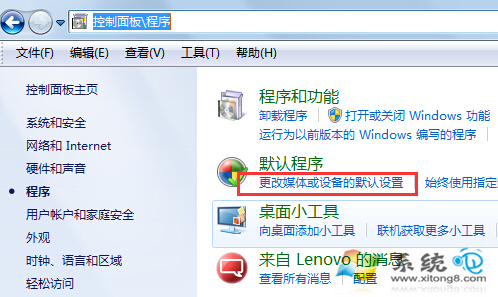
1. 「控制台」→「程式」→「變更預設媒體或裝置的自動播放設定」。
2. 對照清單中各裝置類型(如音樂 CD、相機儲存裝置等),在下拉選單選擇「每次詢問我」、「不採取任何動作」或特定程式,按「儲存」套用。
依個人習慣設定,避免插入裝置時自動彈出視窗干擾。
保護隱私:關閉 Win7 資源管理器搜尋記錄自動儲存功能
Win7「系統調用失敗」雙解法:IE 啟動 Explorer 法 vs 任務管理員終結殺毒衝突法
Win 7工作列輸入法圖示換顏色:個性化鍵盤圖示讓桌面不再灰暗
Windows 7 Build 7048 新圖標賞析:介面細節全面升級
Win7頻繁提示Winmgmt.exe錯誤修復:重建WMI存儲庫Repository文件夾
Win7 行動中心:整合螢幕亮度、音量、電源模式、無線網路、外接螢幕、同步、投影儀,快捷鍵 Win+X 呼叫
Windows 7 純淨版 USB 隨身碟檔案被隱藏恢復方法
3 秒變 Win7 指令高手:用 msconfig「工具」頁籤查詢 50+ 系統指令路徑