Win7 搜尋檔案失效無法找到資料?透過登錄表新增 UseSearchAsst 字串值可修復本地搜尋功能。
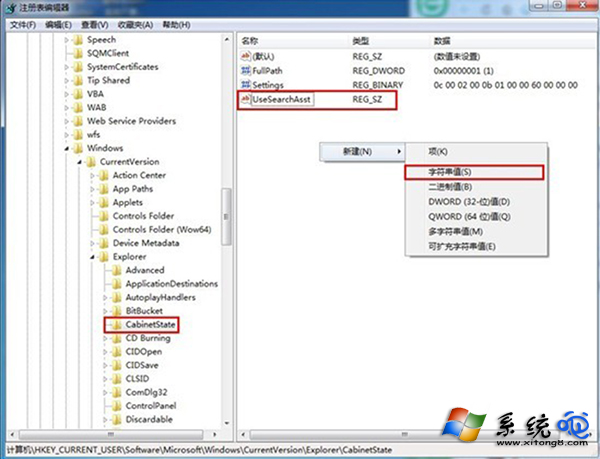
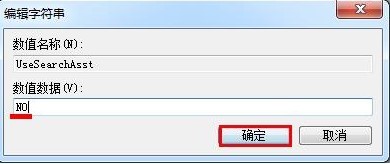
UseSearchAsst
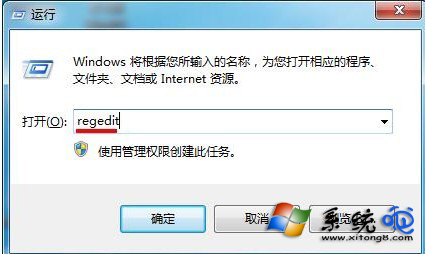
regedit
HKEY_CURRENT_USER\Software\Microsoft\Windows\CurrentVersion\Explorer\CabinetState
NO
完成後重新開機或重新啟動檔案總管,搜尋功能即可恢復正常。
Win 7 滑鼠鍵盤快捷鍵大全:視窗吸附、工作列巡覽、桌面預覽一鍵達陣
Win7 修改活動分區導致無法開機?DiskPart 命令列修復活動標記圖文教程
微軟終止 XP 支援:Windows 7 能否贏得用戶青睞?
Win7 通知區域電源圖示消失?群組原則與通知區域設定雙重恢復
Win7/8.1 開機「正在啟動 Windows」時間過久?BIOS 關閉 CSM 支援加速
Win7 開機啟動項無法載入?管理員權限與安裝順序是關鍵
Windows 7 對 CPU 需求:官方 1GHz 門檻、主流 CPU 全數滿足、視訊轉碼/ XP Mode 需更高效能與虛擬化支援
Windows 7 銷售強勁:上市兩週銷量超 Vista 同期 2.34 倍