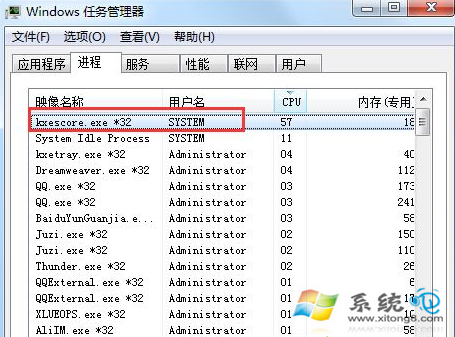
kxescore.exe 為金山毒霸核心服務進程,部分系統上會長期佔用高 CPU/記憶體。不想卸載毒霸時,可禁用其服務降低資源佔用。
禁用服務步驟
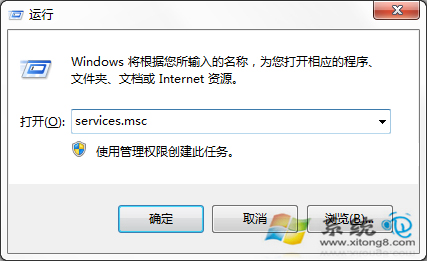
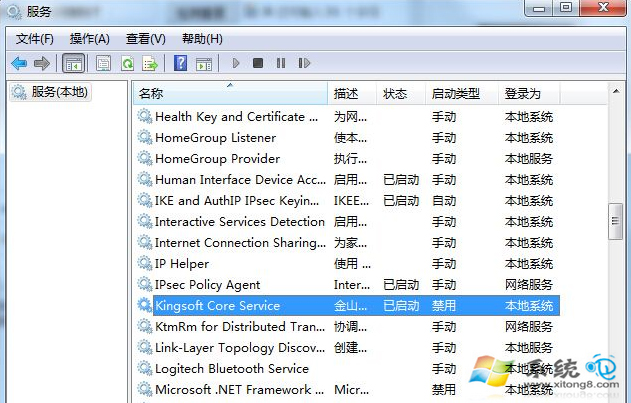
- Win+R →
services.msc 開啟「服務」。
- 找到 Kingsoft Core Service(或 KxesCoreService),雙擊開啟屬性。
- 「啟動類型」改為 禁用,若正在運行點擊「停止」。
- 確定,重新啟動電腦生效。
進階處理
- 若正常模式無法操作,進入安全模式執行上述步驟。
- 徹底解決:在「程式和功能」解除安裝金山毒霸,並使用官方清理工具移除殘留。
- 替代方案:改用 Windows Defender(Win7 需安裝 Microsoft Security Essentials)或其他輕量防毒軟體。
注意
禁用核心服務將導致金山毒霸即時防護、掃描、升級等功能失效,電腦處於無防毒狀態,請確保已部署替代防護方案。