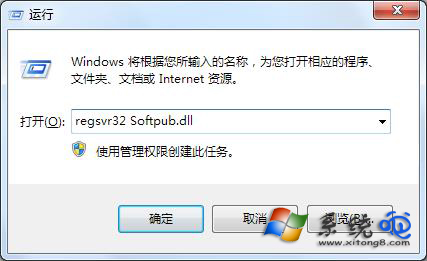
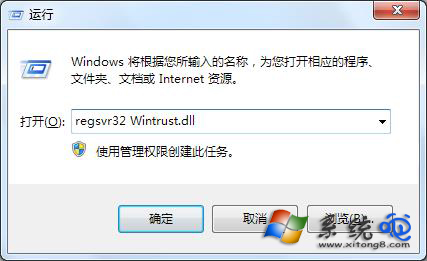
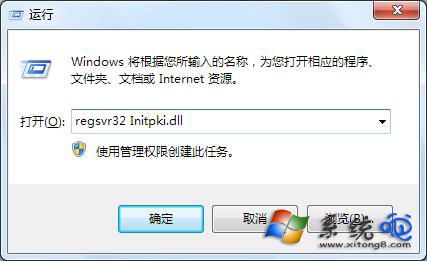
升級 Win7 後開機跳出錯誤代碼 0x80004005,主因是動態連結庫(DLL)未正確註冊。只需以系統管理員身分依序註冊 Softpub.dll、Wintrust.dll、Initpki.dll 即可修復。
0x80004005
Softpub.dll
Wintrust.dll
Initpki.dll
regsvr32 Softpub.dll
regsvr32 Wintrust.dll
regsvr32 Initpki.dll
執行完畢重新開機,錯誤提示即會消失。若問題持續,建議掃描系統檔案完整性(sfc /scannow)或檢查是否有安全軟體攔截註冊動作。
sfc /scannow
Win7/Win8.1 升級 Win10 後螢幕閃爍?安全模式停用兩項錯誤回報服務修復
Windows 7 任務列電源圖示消失?組態原則與通知區域雙重修復
Win7 hlddzSDK.exe 是什麼程序?QQ 鬥地主相關程序分析
Win7 手動啟用內建 Administrator 管理員帳戶圖文教程
Win7 旗艦版關閉遠端桌面功能(重複文章,內容同 78785)
Win7 插上 USB 就變卡?services.exe 佔用資源過高完整解決方案
Win7 附件裡找不到寫字板/計算機/記事本?命令啟動+複製開始選單捷徑雙修復
Win7 縮圖不顯示解決方案:檢查驅動、升級旗艦版啟用 Aero 效果