Windows XP Windows 7 Windows 2003 Windows Vista Windows 綜合教學 Linux 系統教學
Windows 10 Windows 8 Windows 2008 Windows NT Windows Server 電腦軟體教學

Win7 將常用資料夾釘選到任務列:改副檔名 .exe 偽裝法

編輯:Windows 7 系統介紹

Win7 任務列無法直接釘選資料夾,但可將資料夾重命名為 .exe 副檔名偽裝成程式,拖曳到任務列後再建立捷徑修正圖示,實現一鍵開啟常用資料夾。

操作步驟

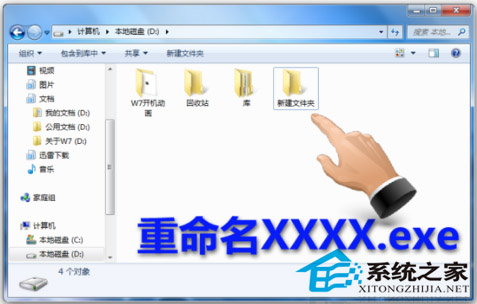
  1. 將常用資料夾重命名,副檔名改為 .exe(如 WorkFolder.exe)。

資料夾重命名為 .exe

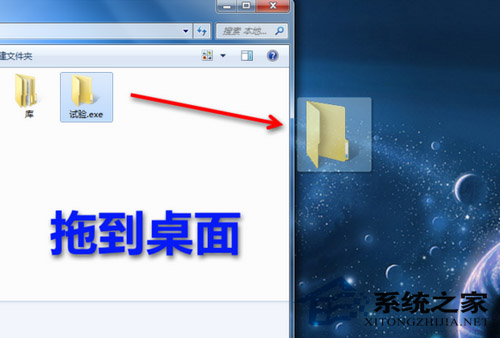
  1. 將該資料夾拖曳到桌面。

拖曳到桌面

  1. 從桌面拖曳到任務列,即釘選成功。

拖曳到任務列

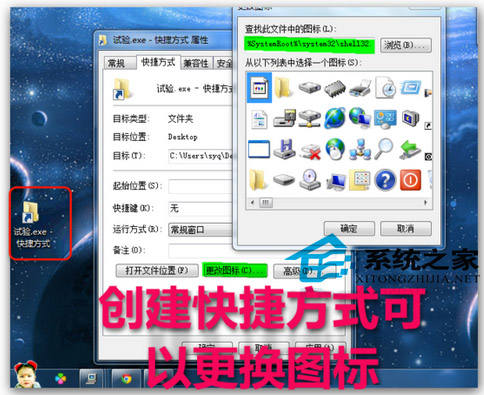
  1. 右鍵任務列圖示 → 右鍵資料夾名稱 → 「內容」→「變更圖示」。
  2. 瀏覽圖示來源:
    C:\Windows\System32\shell32.dll
    C:\Windows\System32\imageres.dll
    選擇喜歡的圖示 → 確定。

變更圖示視窗
選擇 shell32.dll 圖示

原理:Win7 任務列僅接受 .exe/.lnk 類型釘選。重命名為 .exe 欺騙系統允許釘選,實際點擊時 Windows 會以資料夾方式開啟。此為非官方技巧,系統更新可能失效,建議改用「工具列 → 新增工具列 → 選擇資料夾」官方功能。

Copyright © Windows教程網 All Rights Reserved