記事本記錄工作日誌需頻繁加時間?兩大原生技巧 + 輸入法神技,秒級插入時間/天氣。
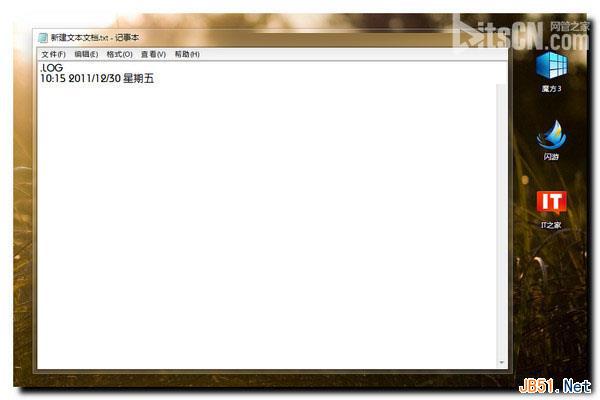
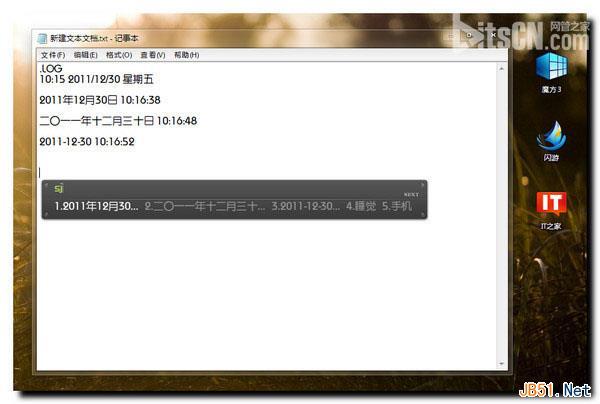
.LOG
sj
rq
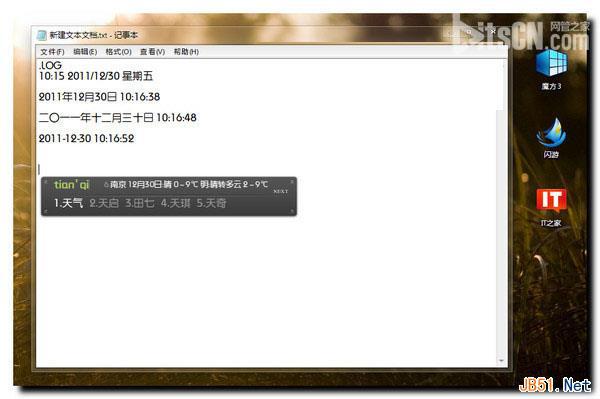
tianqi
適用場景:.LOG 適合固定日誌檔;F5 適合臨時插入;輸入法最通用,任何輸入框皆可用。
Win7 解除安裝已安裝更新補丁:控制台程式和功能檢視已安裝更新
Windows 7 批次檔大全:一鍵清理垃圾、修復圖片緩存、重啟 Explorer、關機、NTFS 轉換...
Win7 資源管理器按鍵盤就跳搜尋框?關閉「輸入時自動選取」恢復正常導航
Win7 「電腦管理」打不開?登錄修正 Manage 命令路徑教學
Windows 7 筆電桌面圖示載入緩慢?修改註冊表 Max Cached Icons 加速顯示
Windows 7 首周銷量是 Vista 的 2.34 倍,但旗艦版表現遜色
變更 Windows 7 歡迎畫面與系統帳號介面顯示語言
Win7 Hosts 檔案位置與快速開啟編輯教學