本文提供精簡步驟,透過修改登錄檔快速將「用記事本開啟」加入右鍵選單,適合熟悉登錄檔操作的使用者參考。
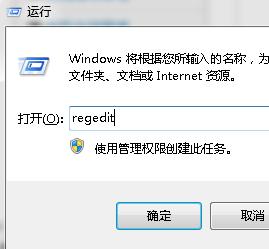
regedit
HKEY_CLASSES_ROOT\*\shell
shell
command
c:\windows\notepad.exe %1
注意:路徑請依實際 Windows 安裝目錄調整,64 位元系統同樣適用。
保護 Windows 7 產品金鑰不外洩:slmgr.vbs 快速移除註冊表金鑰
Windows 7 XP 模式六大缺陷:管理雙系統、安全成本、硬體門檻高
技巧:手動修改 Windows 7 庫圖標,甚至指定自訂 .ico 檔案
Win7 磁碟分區越少越好?善用「程式庫」功能,單一分區也能完美管理檔案
解決 XP 與 Windows 7 檔案共享互訪問題
Windows 7 桌面出現 desktop.ini 半透明檔案:原因與隱藏方法
解決 Windows 7 下 QQ 2009 與 WMP12 相容性衝突,播放不再卡頓
Win7 連接區域網路印表機:啟用 NetBIOS over TCP/IP 解決搜尋不到問題