Windows XP Windows 7 Windows 2003 Windows Vista Windows 綜合教學 Linux 系統教學
Windows 10 Windows 8 Windows 2008 Windows NT Windows Server 電腦軟體教學

Win7 旗艦版滑鼠右鍵選單回應慢?刪除 ContextMenuHandlers 多餘項目加速

編輯:Windows 7 系統介紹

常見現象

  • 右鍵「新增」子選單展開極慢。
  • 桌面空白處右鍵選單彈出延遲數秒。

解決方法:清理殼擴充處理常式

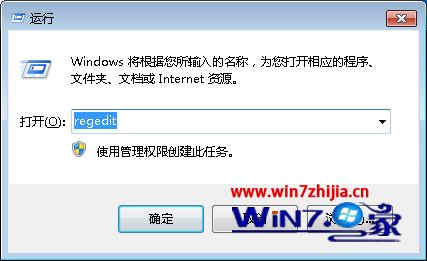
  1. Win+R → regedit。
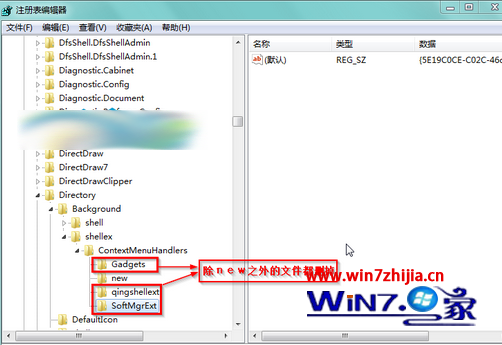
  2. 定位:
    HKEY_CLASSES_ROOT\Directory\Background\shellex\ContextMenuHandlers
  3. 該機碼下**僅保留 New 資料夾**,其餘全部刪除(右鍵資料夾 → 刪除)。
  4. 關閉登錄編輯器,右鍵選單即刻恢復流暢。
執行 regedit ContextMenuHandlers 清理前後

原理與補充

  • 每個第三方軟體安裝常在這裡註冊右鍵選單擴充,項目過多會逐一載入導致延遲。
  • 同樣清理路徑適用於:
    HKEY_CLASSES_ROOT\*\shellex\ContextMenuHandlers(檔案右鍵)
    HKEY_CLASSES_ROOT\Folder\shellex\ContextMenuHandlers(資料夾右鍵)
    HKEY_CLASSES_ROOT\Directory\shellex\ContextMenuHandlers(目錄右鍵)


  • 建議使用 ShellExView(NirSoft)圖形化管理/停用殼擴充,更安全直觀。
Copyright © Windows教程網 All Rights Reserved