關閉休眠(釋放 C 槽空間)
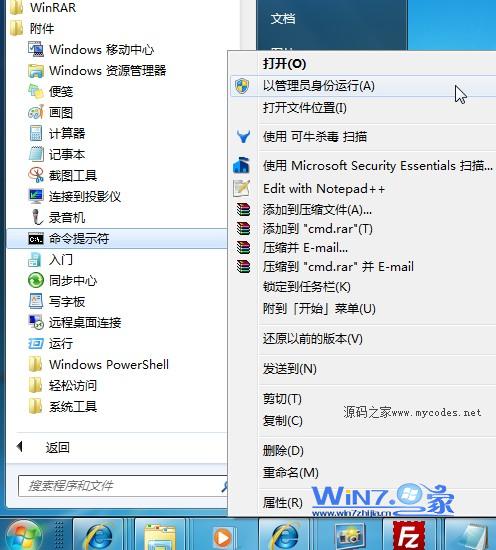
- 開始 → 所有程式 → 附屬應用程式 → 右鍵「命令提示字元」→「以系統管理員身分執行」。
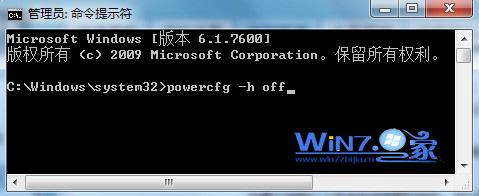
- 輸入:
powercfg -h off 按 Enter。
- 系統會自動刪除
C:\hiberfil.sys(大小等於實體記憶體),釋放數 GB 空間。
重新開啟休眠
同樣以管理員身分執行 CMD,輸入:powercfg -h on,休眠功能即刻恢復,hiberfil.sys 重新建立。
補充說明
- 休眠將記憶體內容寫入硬碟,關機後可快速恢復工作狀態。
- SSD 用戶建議關閉休眠減少寫入量;HDD 或需長時間離開保持工作現場者可保留。
- 關閉休眠後,「關機」選單將不再顯示「休眠」選項。