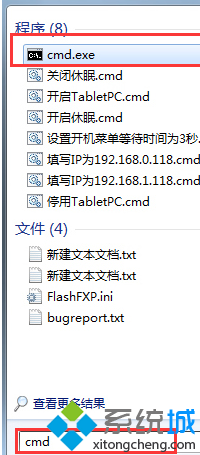
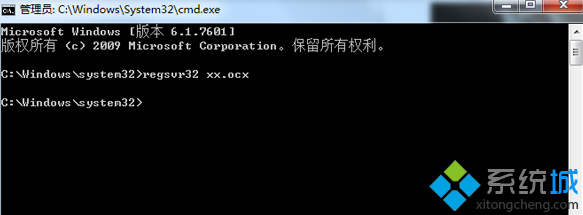
在 Win7 中直接雙擊或以一般權限執行 regsvr32 xxx.ocx 註冊元件時,因權限不足導致錯誤 0x80040200。
regsvr32 xxx.ocx
CMD
regsvr32 路徑\檔案名.ocx
regsvr32 D:\MyLib\common.ocx
%windir%\SysWOW64\regsvr32.exe
regsvr32 /u 檔案名.ocx
在 Windows 7 下安裝獨立 XP 系統組雙系統:安裝光碟法與 Ghost 映像法完整教學
Win7 找不到網路卡(網路介面卡)的解決步驟
Win7 設定 Everyone 權限完整教學:資料夾/磁碟分享、跨帳號存取必備
Win7 稽核原則監控電腦:誰動了我的 QQ、玩了什麼遊戲,事件檢視器全記錄
Win7 內建防火牆完整設定指南:三種網路位置、程式例外、入站規則自訂
Win7 任務列日期顯示星期:控制台→日期時間→變更行事曆設定→短日期 yyyy-M-d dddd、長日期 yyyy'年'M'月'd'日' dddd
Windows 7 RC 出現 UAC 權限 Bug:標準用戶無法建立子資料夾、部分軟體無法安裝
64 位元 Win7 程式頻繁「已停止運作」 綜合排查與 DEP 設定解決方案