Windows XP Windows 7 Windows 2003 Windows Vista Windows 綜合教學 Linux 系統教學
Windows 10 Windows 8 Windows 2008 Windows NT Windows Server 電腦軟體教學

Win7 開機提示「部分便利貼的中繼資料已損毀」修復方法

編輯:Windows 7 系統介紹

此錯誤表示便利貼資料檔 (StickyNotes.snt) 或系統元件 InkObj.dll 損毀。重新註冊 DLL 可修復。

修復步驟

  1. 開啟檔案總管,搜尋 InkObj.dll 找到其完整路徑 (通常在 C:\Windows\System32 或 C:\Windows\SysWOW64)。
  2. 按 Win + R 輸入:regsvr32 "C:\Windows\System32\InkObj.dll" (路徑依實際位置調整),按 Enter。
  3. 提示「DllRegisterServer 成功」即完成。
  4. 若提示需註冊 TPCPS.dll,同樣執行 regsvr32 "路徑\TPCPS.dll"。
  5. 重新開機,錯誤訊息應消失,便利貼功能恢復正常。

若問題持續,可刪除 %AppData%\Microsoft\Sticky Notes\StickyNotes.snt 重建便利貼資料 (注意會遺失現有便利貼內容)。
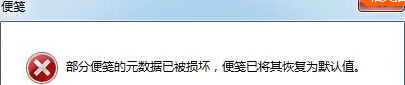
便利貼中繼資料損毀錯誤
Copyright © Windows教程網 All Rights Reserved