Windows XP Windows 7 Windows 2003 Windows Vista Windows 綜合教學 Linux 系統教學
Windows 10 Windows 8 Windows 2008 Windows NT Windows Server 電腦軟體教學

Win7 開機倒數關機提示「NT AUTHORITY\SYSTEM」?Blaster 蠕蟲病毒專殺指南

編輯:Windows 7 系統介紹

現象:開機 60 秒倒數關機,訊息「由 NT AUTHORITY\SYSTEM 起始」

經典 Blaster (MSBlast) 蠕蟲病毒 特徵:攻擊 RPC 漏洞 (TCP 135/4444),導致 LSASS.EXE 崩潰,系統觸發 60 秒關機倒數。

緊急處理:中斷關機倒數

  1. Win+R → cmd。
  2. 開啟 CMD
  3. 輸入:shutdown.exe -a(-a 前有空格) → Enter。倒數取消。

臨時緩解:建立唯讀 dcpromo.log 佔用漏洞路徑

  1. CMD 依序執行:
echo dcpromo > %systemroot%\debug\dcpromo.log
attrib +R %systemroot%\debug\dcpromo.log

佔用病毒利用的漏洞路徑,延緩再次攻擊,爭取時間修補。

徹底清除:結束病毒程序 + 打補丁

  1. Ctrl+Alt+Del → 工作管理員 → 「程序」分頁 → 結束下列可疑程序(若存在):
  • *_up.exe (如 12345_up.exe)
  • avserve*.exe
  • skynetave*.exe
  • hkey.exe, msiwin84.exe, wmiprvsw.exe(注意:wmiprvse.exe 是合法系統程序,**勿結束**)
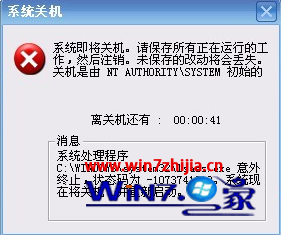
Blaster 病毒關機倒數
  1. 離線安裝 MS03-026 (KB823980) 修補 RPC 漏洞(Microsoft 官網下載對應版本)。
  2. 全盤查毒、修改弱密碼、關閉不必要共用資料夾、開啟防火牆封鎖 TCP 135/4444/139。

現代補充

Win7 SP1 已內建修補此漏洞。若仍中招,說明系統未打 SP1 或防火牆關閉且直連公網。建議直接重灌乾淨版 Win7 SP1 + 所有更新。

Copyright © Windows教程網 All Rights Reserved