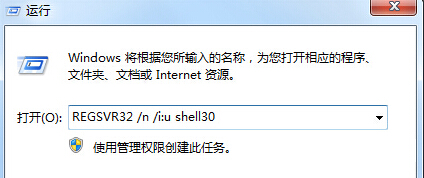
DLL 故障可透過 regsvr32 重新註冊修復。
regsvr32
SHELL32.dll
REGSVR32 /n /i:u shell32.dll
重新註冊故障 DLL 通常可解決動態連結程式庫錯誤。
Windows 7 新增鍵盤快速鍵與滑鼠操作大全:視窗管理、工作列、桌面、輔助工具、總管一網打盡
Windows 7 絢麗主題與桌面背景完整指南:啟用、隱藏主題解鎖、線上下載與自訂封裝
Windows 7 重燃微軟「維納斯計劃」夢想,同方 PC-靈悅 2 領銜數位家庭
解決 Windows 7/8/8.1 Hosts 檔案無法修改儲存的兩大方案
Win 7 虛擬機安裝 Win 7 完整圖文教學:Hyper-V / Virtual PC 實戰
Win7 IE8 無法登入網銀解決:修正登錄銀行驅動路徑
Win7 十大常見問題與解決方案全攻略
Windows 7 與 Windows 8 效能實測大比拚