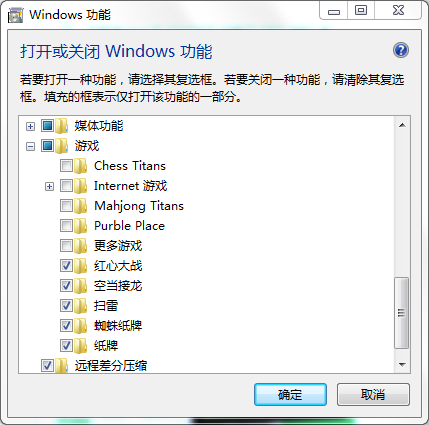
移除後可釋放少量磁碟空間與記憶體,對不玩內建遊戲的使用者建議關閉。
Win7玩遊戲無法全螢幕?三大解決方案:顯卡縮放、解析度切換、註冊表Scaling修改
Win7 程式捷徑鍵自訂:右鍵屬性→捷徑鍵欄位直接按鍵盤組合(如 Ctrl+Alt+A)→ 一鍵啟動,解放滑鼠
Windows 7 修改預設安裝路徑後系統程式無法執行解決:複製 Program Files 內容
Win7運行msconfig提示「找不到文件 msconfig.msc」?註冊表添加App Paths鍵值修復系統配置啟動路徑
Win7 如何用群組原則鎖定硬碟禁止存取?保護隱私資料不被他人查看
Win7 網路圖示出現黃色驚嘆號無法上網?兩招快速修復
善用 Win7 開始功能表搜尋:全電腦秒找檔案、程式、設定,右鍵直接操作
Acer Aspire One D250:雙系統體驗,Win 7 與 Android 的完美融合