關閉 UAC 導致側邊欄小工具無法啟動,解決方法:
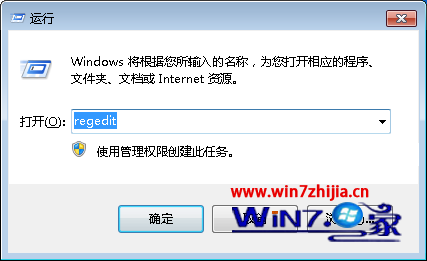
regedit
HKEY_LOCAL_MACHINE\SOFTWARE\Microsoft\Windows\CurrentVersion\Sidebar\Settings
AllowElevatedProcess
1
Windows 7 如何查看 IP 位址?三種快速查詢法
Win7 內建資源監視器查看 QQ 好友 IP,無需外掛插件
Windows 7 RC 明日 (6/1) 正式退役:黑色桌面、非正版警告、每兩小時重啟
微軟宣布:Windows 7 開機動畫不支援用戶自訂,安全與效能優先
Win7 系統還原點建立與使用教學:保護系統狀態隨時回溯
Win7 桌面圖示變小?三種調整大小方法任你選
Win7 群組原則限制僅允許特定 USB 隨身碟:硬體 ID 白名單機制
Win7 為共享資料夾設定「完全控制」權限的步驟