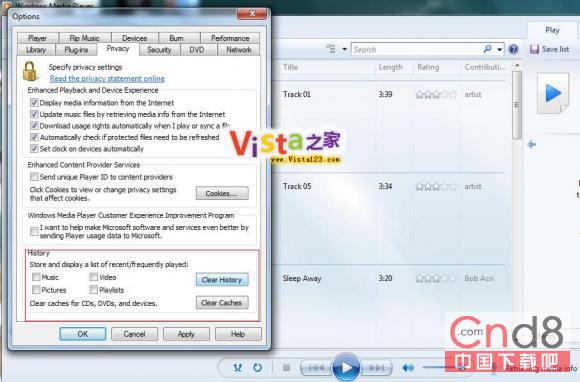
Windows 7 超級工作列與開始功能表的 Jump List 會顯示 WMP12 最近播放的影音檔案。不想被他人看到播放記錄可關閉:
設定後 Jump List 不再顯示播放歷史,保護隱私。
Windows 7 系統十大隱性安全特性(精簡版)
Windows 7 螢幕保護裝設定在哪?一鍵找到新位置
Win7 前置面板耳機插孔無聲音?Realtek 音效管理器停用前面板偵測即可解決
高手分享 Windows 7 70 招基礎技巧(前 10 招):移除側邊欄、音量調整、以其他使用者身分執行、虛擬硬碟 VHD、移除 Live Messenger、鎖定螢幕、建立鎖定捷徑、啟用開始功能表「執行」、改善 NVIDIA 桌面視窗管理、變更預設儲存位置
Win7藍屏代碼0x00000050解決:從超頻回退到硬件故障分級排查指南
Windows 7 顛覆 Vista 四大理由:實用介面、簡潔交互、開放網路、原創技術
Windows Vista 讓非 Unicode 中文軟體正常執行:修改系統地區語言設定
Win 7假死/停止回應四大典型場景診斷與解決方案