Win7 搜尋功能強大,但下拉列表會保留所有歷史關鍵字,公用電腦存有隱私風險。透過群組原則可徹底關閉。
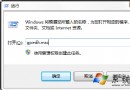
gpedit.msc
生效後不再自動保存搜尋記錄,搜尋建議也會關閉。補充:地址列歷史可右鍵選「刪除歷史記錄」清除。
Win7 無法建立資料庫錯誤 16389 解決辦法
Win7 網卡頻繁被禁用?關閉電源管理選項徹底解決
XP 升級 Windows 7 前必思考的 7 大理由:別急著換,先算筆帳
Windows 7 新增「列印目錄」功能:命令列一次列印與右鍵選單永久整合兩種做法
Windows 7 開機動畫錯誤變綠條?檢查 bcdedit locale 語言設定,修正為 zh-CN 即可恢復
將 Win7 7100 RC 升級至 7600 正式版:修改語言與 cversion.ini 兩步驟完美升級
解決 Windows 7 錯誤 1079:服務啟動帳號不一致
Win7 絕對不可關閉的 6 大核心服務:防毒、DNS Client、網路連線、Plug and Play、列印佇列、RPC