Win7 無圖形化定時關機介面,但內建 shutdown.exe 命令支援豐富參數,透過 CMD 即可實現精確定時關機、重開機、登出、休眠。
shutdown [參數] [時間(秒)]| 參數 | 功能 |
|---|---|
-s | 關機 |
-r | 重開機 |
-l | 登出 |
-h | 休眠 |
-f | 強制關閉應用程式不提示 |
-t xxx | 設定倒數秒數 (預設 30 秒) |
-a | 中止已排程的關機/重開機 |
-c "訊息" | 顯示關機提示訊息 |
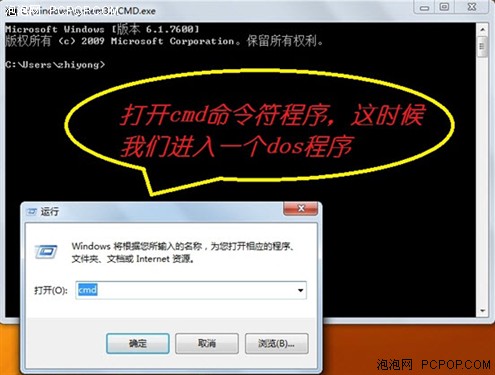
shutdown -s -f -t 3600shutdown -r -f -t 1800 -c "系統維護重開機,請儲存工作"shutdown -ashutdown -s -f -t 0cmd 開啟命令提示字元。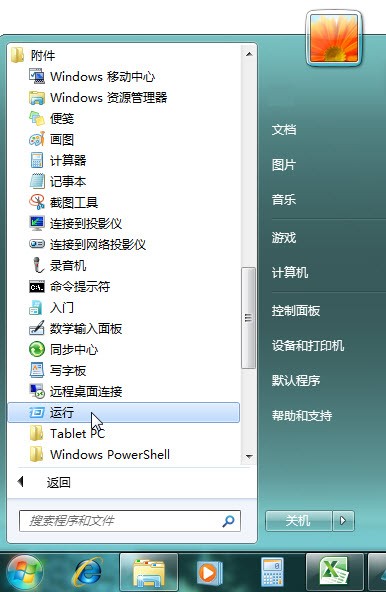
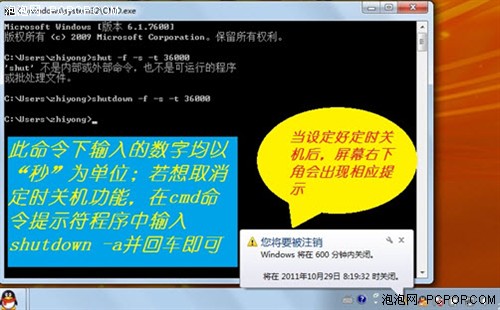
shutdown -s -f -t 3600。shutdown -a。控制台 →「系統管理工具」→「工作排程器」→ 建立基本工作 → 觸發條件設定時間 → 動作「啟動程式」:shutdown.exe,引數 -s -f -t 0,可實現每日定時關機。