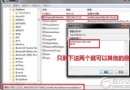
裝了不相容的優化軟體後,Win+E 失效、檔案總管打不開?通常是登錄檔 HKEY_CLASSES_ROOT\Folder\shell\explore\command 的 DelegateExecute 值被改壞。將下列內容存為 修復win+e.reg 雙擊匯入即可修復:
Windows Registry Editor Version 5.00

[HKEY_CLASSES_ROOT\Folder\shell\explore\command]
"DelegateExecute"="{11dbb47c-a525-400b-9e80-a54615a090c0}"
匯入後重開機或重啟 explorer.exe,Win+E 立刻恢復正常。提醒:安裝優化/清理軟體前確認支援 Win7,避免動到關鍵登錄檔。