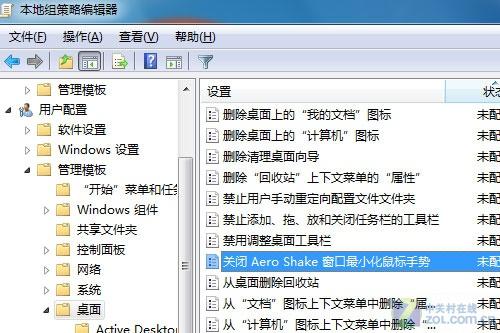
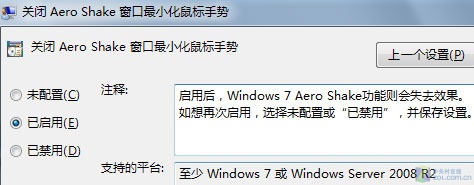
Windows 7 旗艦版引入 Aero Shake:搖晃視窗可將其他視窗最小化,再搖一次還原。許多使用者不習慣此手勢,透過群組原則可停用。
gpedit.msc
實測結論:作者對比啟用/停用前後系統資源佔用,未發現明顯差異。停用 Aero Shake 主要為避免誤觸發、符合個人操作習慣,而非為節省資源。此功能僅存在於 Windows 7 / Server 2008 R2,Vista 不支援。
Win 7 喇叭沒聲音?善用內建「播放音訊」疑難排解精靈快速診斷
Win7 修改 MAC 位址後無法還原的解決辦法
Win7 如何查看電腦近期被誰用過?群組策略開啟「顯示前次登入資訊」
Win7 「載入驅動程式失敗」三大成因與解決對策
Windows 7 修改 hosts 檔案:以管理員身分執行記事本編輯
破解 QQ 空間加密相冊?小心法律風險與隱私倫理
一鍵清除 Win7 遊戲記錄,保護隱私不留痕跡
Win7 寬帶連線錯誤 738 怎麼辦?設定 TCP/IP 為自動取得 IP 解決