test
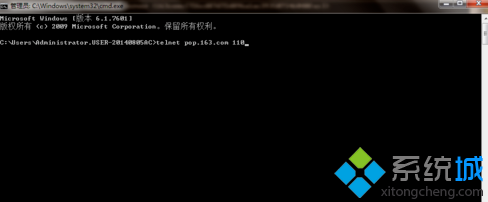
cd /d D:\test
cmd.exe
perfmon.exe
C:\Windows\System32\perfmon.exe /res
內建工具免安裝第三方解鎖軟體,系統管理員必備技能。
Win7 64位元系統快速安裝/更新驅動程式:裝置管理員一鍵搞定
Win7 資料夾右鍵選單出現亂碼?控制台語言設定或登錄修正 ANSI/OEM 字碼頁
Win7 開啟 AHCI 導致藍屏 0x7B 解決法:註冊表啟用 msahci + 重裝 IDE 控制器
Windows 7 系統加速 5 招:輕鬆提升電腦效能
Win7瀏覽器點擊旺旺無法自動啟動阿里旺旺?指定瀏覽器路徑修復協議關聯
Windows 7 忘記登入密碼破解:利用 System 權限 CMD 重設密碼 / 啟用內建 Administrator 完整圖文教學
Win7 旗艦版更改電腦睡眠時間:電源選項自訂待機/睡眠/關閉螢幕時程
Windows 7 總管功能全解析:系統資訊、優化、清理、個性化、安全、網路一站式管理