Windows XP Windows 7 Windows 2003 Windows Vista Windows 綜合教學 Linux 系統教學
Windows 10 Windows 8 Windows 2008 Windows NT Windows Server 電腦軟體教學

Win7 無法向 Windows Media Player 媒體庫新增檔案?重建資料庫輕鬆搞定

編輯:Windows 7 系統介紹

癥狀與成因

當 Windows Media Player (WMP) 拒絕將音樂、影片加入媒體庫,通常是媒體庫資料庫損毀或服務卡死所致。解決核心在於「停止服務 → 重命名資料夾 → 讓系統自動重建」。

步驟 1:停止所有 WMP 相關服務

  1. 關閉 Windows Media Player。
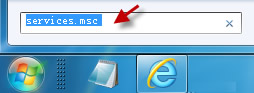
  2. 按 Win+R 輸入 services.msc 開啟服務管理員。
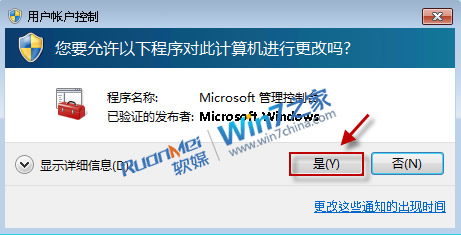
  3. 若彈出 UAC 提示,點選「是」。
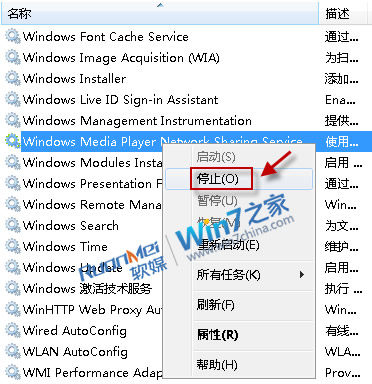
  4. 找到所有以「Windows Media Player」開頭的服務,若狀態為「已啟動」,右鍵選擇「停止」。


步驟 2:重命名 Windows Media 資料夾

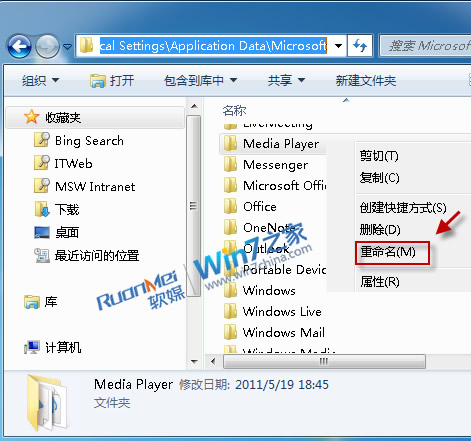
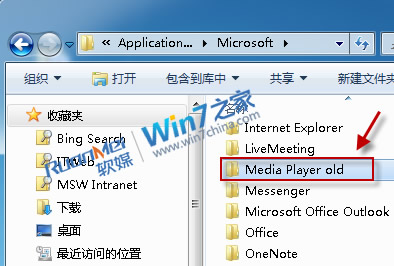
  1. 在檔案總管地址列輸入 %USERPROFILE%\Local Settings\Application Data\Microsoft 並按 Enter。
  2. 找到 Windows Media 資料夾,右鍵重命名為 Windows Media Old(名稱任意)。


步驟 3:重新啟動 WMP 驗證

再次開啟 Windows Media Player,系統會自動在原位置重建一個乾淨的 Windows Media 資料夾,媒體庫功能即可恢復正常。
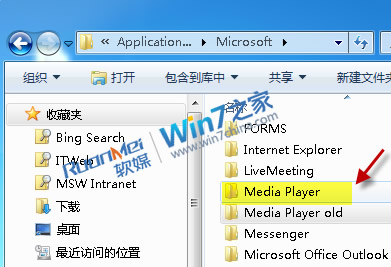
此法不僅解決「無法新增檔案」,也能修復媒體庫讀取緩慢、分類錯亂等衍生問題。

Copyright © Windows教程網 All Rights Reserved