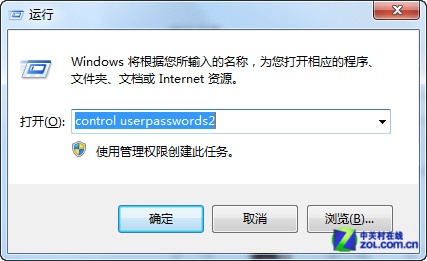
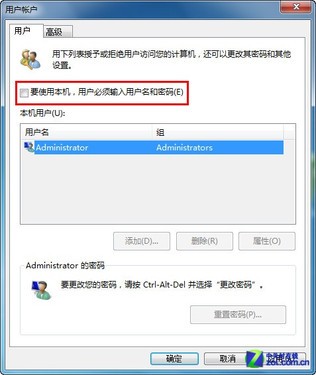
控制台找不到「跳過歡迎畫面」選項,實際上需透過指令開啟隱藏的「使用者帳戶」控制台:
control userpasswords2
安全提醒:多人共用電腦請勿啟用此設定,以免隱私外洩。
Win7 工作列技巧(同 13438 內容)
Win7 開啟資料夾提示「引用了一個不可用的位置」:登錄表修復「我的文件」路徑
Win7 IE瀏覽器每次開啟非最大化視窗?升級IE11或還原進階設定修復
Windows 7 超級工作列鎖定網站:一鍵開啟常用網頁
Win 7 滑鼠隱藏神技:拖曳對齊/最大化、搖晃最小化非作用視窗、Win+Home 鍵盤替代
Win 7 檔案反選功能隱藏在選單裡:Alt 鍵喚出編輯選單
Win7 找回「開始」功能表「最近使用的項目」功能
Win7 系統保留分區(100MB/200MB)能否刪除?深度解析