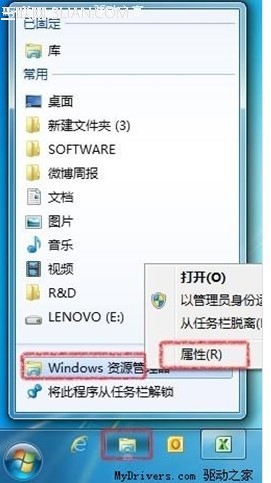
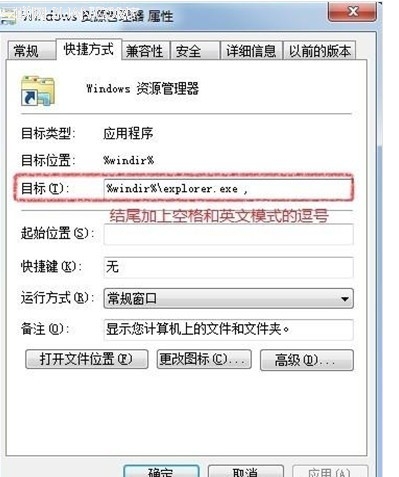
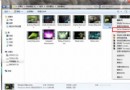
Win 7 任務列預設釘選的「檔案總管」圖示點擊後會開啟「程式庫」。若習慣直接進入「電腦」(我的電腦)查看磁碟機,只需修改捷徑目標參數即可。
%windir%\explorer.exe
%windir%\explorer.exe ,
同理,若想預設開啟特定資料夾(如 D:\Downloads),可將目標改為:%windir%\explorer.exe /e, D:\Downloads修改後重新點擊任務列圖示即生效,同樣適用於其他釘選程式的啟動參數調整。
%windir%\explorer.exe /e, D:\Downloads
電腦短暫不用:關機、睡眠、休眠、混合睡眠該選哪個?微軟官方調查與詳細機制比較
Win7 旗艦版使用中需警惕的可疑進程:六大惡意程式特徵辨識
Win7 一鍵休眠/睡眠捷徑建立教學:rundll32 powrprof.dll,SetSuspendState
Win7 開機啟動項不執行?msconfig 正常啟動失效/Administrator 帳戶未啟用/瑞星安全助手修復
Windows 7 螢幕保護程式設定五步驟完成
Windows 7 程式庫功能詳解:建立、管理與搜尋整合實戰
Win7/Win8.1 右鍵選單加入「記事本、QQ、截圖、滑動關機」:登錄編輯實戰
Win7 僅識別特定 USB 隨身碟:群組原則限制裝置安裝 ID 實作指南