Windows XP Windows 7 Windows 2003 Windows Vista Windows 綜合教學 Linux 系統教學
Windows 10 Windows 8 Windows 2008 Windows NT Windows Server 電腦軟體教學

Windows 7 XP Mode 虛擬化硬體需求:CPU 必須支援 VT-x/AMD-V、記憶體建議 2GB 以上

編輯:Windows 7 系統介紹

核心需求:CPU 硬體虛擬化支援

XP Mode 以 Windows Virtual PC 執行,要求 CPU 支援硬體虛擬化技術(Intel VT-x / AMD-V)並在 BIOS 中啟用。

Intel 處理器支援對照(節錄)

系列型號範例支援 VT-x
Core 2 Duo 行動版P7350/7450, T5200/5250/5270/5300/5450/5470, T6400/6570不支援
Core 2 Duo 桌上型/較新行動版E8000 系列、T9000 系列、P8000 系列等支援
Core i3/i5/i7 (全系列)所有型號支援

完整名單請查閱 Intel ARK 網站 Intel® Virtualization Technology (VT-x) 欄位。

AMD 處理器

除 Sempron 系列外,所有在售處理器(Athlon II、Phenom II、FX、APU 等)均支援 AMD-V,可直接執行 XP Mode。
記憶體建議

  • 最低 2 GB(主機 + 虛擬機各 1 GB 緊湊)。
  • 建議 4 GB 以上,分配 1-2 GB 給 XP Mode,主機仍保留 2 GB 以上。

取得與安裝

  • 僅 Professional、Enterprise、Ultimate 版包含授權。
  • 購買後至微軟網站免費下載「Windows XP Mode」安裝包(含 Virtual PC + 預裝 XP 虛擬硬碟)。
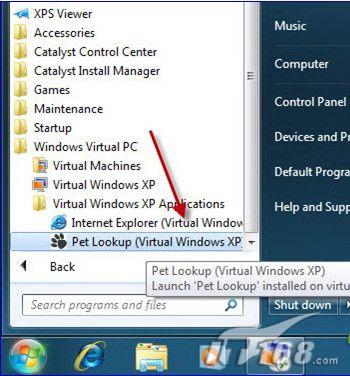
  • 安裝後開始選單出現「Windows Virtual XP」捷徑,啟動即進入無縫模式。

開始選單出現 Virtual Windows XP 登入 Virtual Windows XP

Copyright © Windows教程網 All Rights Reserved