Win7 權限機制嚴格,常遇到無法修改、刪除系統檔或舊資料夾。需取得「所有權」並授予 Administrators 群組完整控制權。提供兩種方法:匯入登錄檔加入右鍵選單、或使用優化工具。
TakeOwnership.reg:Windows Registry Editor Version 5.00 [HKEY_CLASSES_ROOT\*\shell\runas] @="管理員取得所有權" "NoWorkingDirectory"="" [HKEY_CLASSES_ROOT\*\shell\runas\command] @="cmd.exe /c takeown /f \"%1\" && icacls \"%1\" /grant administrators:F" "IsolatedCommand"="cmd.exe /c takeown /f \"%1\" && icacls \"%1\" /grant administrators:F" [HKEY_CLASSES_ROOT\exefile\shell\runas2] @="管理員取得所有權" "NoWorkingDirectory"="" [HKEY_CLASSES_ROOT\exefile\shell\runas2\command] @="cmd.exe /c takeown /f \"%1\" && icacls \"%1\" /grant administrators:F" "IsolatedCommand"="cmd.exe /c takeown /f \"%1\" && icacls \"%1\" /grant administrators:F" [HKEY_CLASSES_ROOT\Directory\shell\runas] @="管理員取得所有權" "NoWorkingDirectory"="" [HKEY_CLASSES_ROOT\Directory\shell\runas\command] @="cmd.exe /c takeown /f \"%1\" /r /d y && icacls \"%1\" /grant administrators:F /t" "IsolatedCommand"="cmd.exe /c takeown /f \"%1\" /r /d y && icacls \"%1\" /grant administrators:F /t"
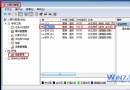
Vista/Win7 優化大師、Windows 7 優化大師、Vista 總管、Windows 7 總管等工具的「右鍵設定」中均內建「新增取得管理員權限」功能,勾選套用即可,無需手動編輯登錄。
HKLM\SAM、HKLM\SECURITY,揭露隱藏管理員帳號、木馬植入點。System Volume Information 受保護,取得權限後可清理釋放空間或建立隱私資料夾。termsrv.dll 替換 XP 同名檔啟用多使用者遠端桌面。