Windows XP Windows 7 Windows 2003 Windows Vista Windows 綜合教學 Linux 系統教學
Windows 10 Windows 8 Windows 2008 Windows NT Windows Server 電腦軟體教學

Win7 64 位元輸入密碼後黑屏修復教學

編輯:Windows 7 系統介紹

Win7 64 位元用戶輸入密碼登入後出現黑屏,僅剩滑鼠游標,主因為 explorer.exe 進程異常或登錄檔 Shell 值錯誤。

暫時解決方案

  1. Ctrl + Shift + Esc 開啟工作管理員
  2. 「進程」分頁找到 explorer.exe → 右鍵「結束進程」
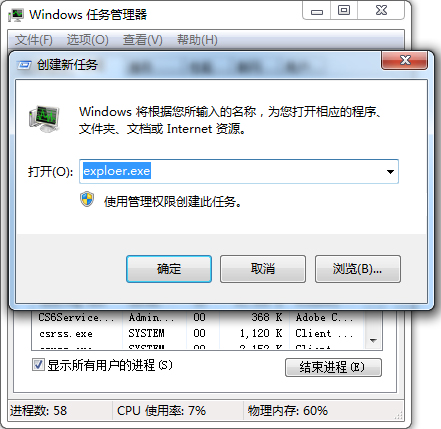
  3. 「檔案」→「執行新工作」→ 輸入 explorer.exe 重新啟動

缺點:每次登入皆需重複操作,未根治。

根本解決:修正登錄檔 Shell 值

  1. Win + R 輸入 regedit
  2. 瀏覽至:
    HKEY_LOCAL_MACHINE\SOFTWARE\Microsoft\Windows NT\CurrentVersion\Winlogon
  3. 檢查右側 Shell 鍵值,資料應為 explorer.exe
    若非此值(如多出路徑、空白、或為其他程式)→ 雙擊修正為 explorer.exe
  4. 重新開機驗證

登入後黑屏畫面

常見原因

  • 惡意軟體修改 Shell 值掛載自身程式
  • 優化工具誤刪或修改關鍵登錄檔
  • 第三方桌面增強軟體衝突

修正 Shell 值後可徹底解決登入黑屏問題,建議搭配全系統掃毒確保乾淨。

Copyright © Windows教程網 All Rights Reserved