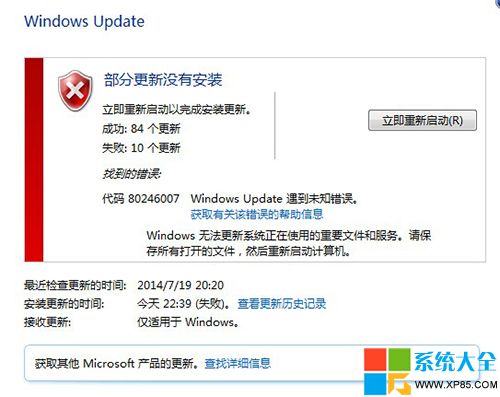
Windows 7 更新失敗顯示錯誤碼 80246007,主因為 Background Intelligent Transfer Service (BITS,後台智慧傳輸服務) 未啟動。BITS 負責更新檔案的背景下載傳輸。
sc config bits start= delayed-auto
sc start bits
wuauclt /detectnow
BITS 正常運作需以下服務亦為執行中:
| 錯誤碼 | 常見原因 | 主要對應服務 |
|---|---|---|
| 80246007 | BITS 服務未啟動 | Background Intelligent Transfer Service |
| 80070422 | Windows Update 服務未啟動 | wuauserv |
| 80070005 | 存取被拒絕 (權限/防火牆) | 相關服務權限 |
| 8024402C | 連線逾時/Proxy 設定錯誤 | 網路連線、WinHTTP 設定 |
| 0x80070643 | 更新安裝失敗 (檔案損壞/衝突) | Windows Installer、CSI |
net stop wuauserv && net stop bits && ren %systemroot%\SoftwareDistribution SoftwareDistribution.old && net start wuauserv && net start bits
sfc /scannow