Windows XP 正常運行時,工作管理員「處理程序」頁籤會列出數十個系統程序。了解各程序功能,有助於識別惡意軟體偽裝、排查系統異常。
| 程序名稱 | 完整名稱/功能 | 說明 |
|---|---|---|
| smss.exe | Session Manager SubSystem | 會話管理器,負責建立系統會話、載入核心驅動、啟動 csrss.exe/winlogon.exe。 |
| csrss.exe | Client/Server Runtime SubSystem | 用戶端/伺服器執行子系統,管理主控台視窗、執行緒、進程結束、硬體抽象層互動。 |
| winlogon.exe | Windows Logon Process | 管理使用者登入/登出、安全性注意序列 (Ctrl+Alt+Del)、載入使用者設定檔、啟動殼層 (explorer.exe)。 |
| services.exe | Services Control Manager | 服務控制管理器,啟動/停止/管理所有 Windows 服務 (自動/手動/停用)。 |
| lsass.exe | Local Security Authority Subsystem Service | 本地安全性授權子系統,處理驗證、權杖發放、安全性原則、EFS 加密金鑰管理。 |
| svchost.exe (多個) | Generic Host Process for Win32 Services | 通用服務宿主,載入 DLL 形式的服務 (如 Windows Update、音訊、網路、防火牆等)。 |
| spoolsv.exe | Print Spooler Service | 列印佇列服務,管理列印工作佇列、驅動程式、列印處理器。 |
| explorer.exe | Windows Explorer | Windows 殼層,提供桌面、工作列、開始功能表、檔案總管、右鍵選單等使用者介面。 |
| internat.exe | Input Locales Indicator | 系統匣輸入法指示器 (EN/CH 圖示),僅 XP/Server 2003 存在,Vista 後整合至桌面語言列。 |
| 程序 | 服務名稱 | 功能 |
|---|---|---|
| mstask.exe | Task Scheduler | 工作排程器,執行排程工作。 |
| regsvc.exe | Remote Registry | 遠端登錄檔服務,允許網路存取登錄檔。 |
| winmgmt.exe | WMI | Windows Management Instrumentation,提供系統管理資訊查詢。 |
| inetinfo.exe | IIS Admin Service | IIS 管理服務,提供 FTP/WWW 服務管理。 |
| tlntsvr.exe | Telnet | Telnet 伺服器,允許遠端命令列登入。 |
| tftpd.exe | TFTP | 簡易檔案傳輸協定伺服器 (遠端安裝服務用)。 |
| termsrv.exe | Terminal Services | 終端機服務,提供遠端桌面/多會話。 |
| dns.exe | DNS Server | 網域名稱系統伺服器。 |
C:\Windows\System32\ (或 C:\Windows\)。若在 Temp、AppData、使用者目錄下 → 高度可疑。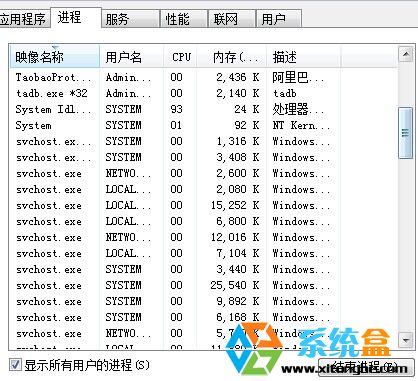
熟悉 XP 核心程序清單,是系統管理員、資安人員、進階使用者的基本功。Vista/7/8/10/11 架構雖演進 (如引入 DWM、AppContainer、Virtualization-based Security),但 smss、csrss、winlogon、services、lsass、svchost、explorer 等核心角色延續至今,理解 XP 基礎有助於掌握現代 Windows 內部運作。