Windows XP Windows 7 Windows 2003 Windows Vista Windows 綜合教學 Linux 系統教學
Windows 10 Windows 8 Windows 2008 Windows NT Windows Server 電腦軟體教學

解決 Windows 7「找不到指定路徑」服務啟動錯誤

編輯:Windows 7 系統介紹

問題原因

服務對應的可執行檔路徑與登錄檔中 ImagePath 數值不一致,導致服務無法啟動並彈出「找不到指定路徑」。

修復步驟

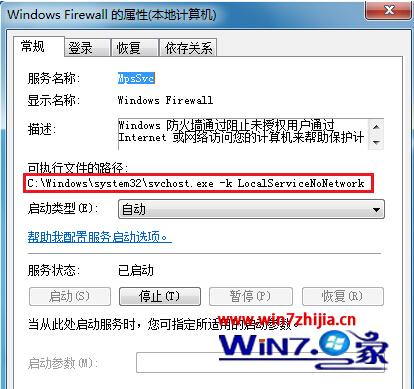
  1. Win+R 輸入 services.msc 開啟服務管理員,找到報錯服務(如 Windows Firewall),查看「執行檔路徑」。
  2. Win+R 輸入 regedit 開啟登錄編輯器,定位至:
    HKEY_LOCAL_MACHINE\SYSTEM\CurrentControlSet\Services\MpsSvc
  3. 檢查右側 ImagePath 數值資料是否與服務管理員顯示的路徑完全一致(例如:%SystemRoot%\system32\svchost.exe -k LocalServiceNoNetwork)。
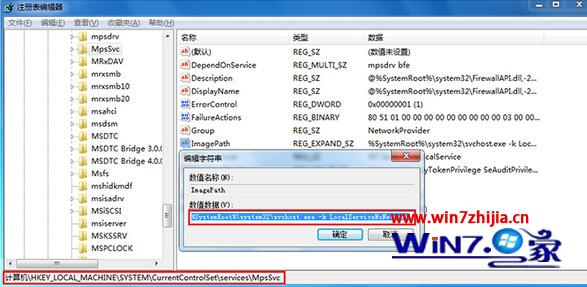
  4. 若不一致,雙擊修正為正確路徑,按「確定」。
  5. 重新開機生效。

服務管理員查看執行檔路徑
登錄編輯器修正 ImagePath

補充

此法適用於大多數因路徑不符導致的服務啟動失敗,修改登錄前建議匯出備份對應機碼。

Copyright © Windows教程網 All Rights Reserved