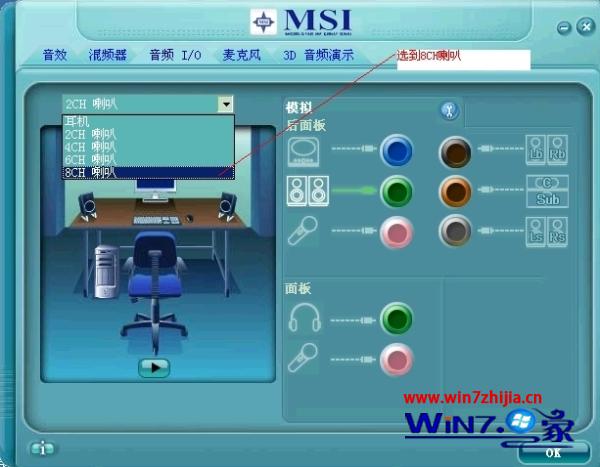
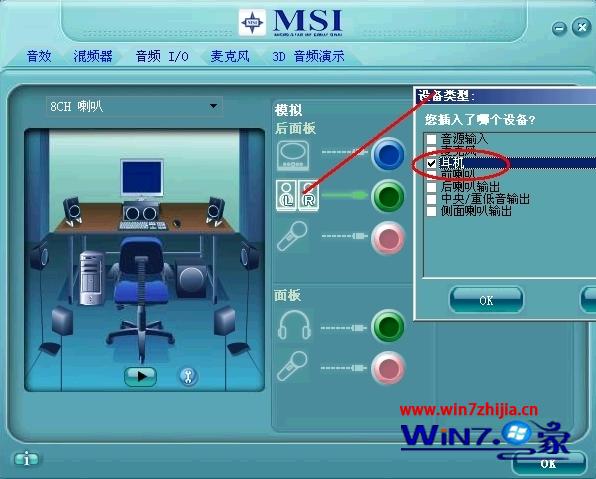
透過調整聲卡輸出模式,解決遊戲音量過小、音效不佳等問題,釋放 HD 音效潛能。
完成設定後,遊戲與多媒體音效將更飽滿、立體。
聯想筆電 Win7 如何開啟藍牙?外部開關 + Fn+F5 雙重確認
Win7 禁止開機彈出 Adobe Flash Player 自動更新視窗 (控制台設定法)
Win7虛擬內存優化設置指南:釋放物理內存壓力提升性能
Windows 7 編輯 hosts 檔案綁定網域/IP 完整教學
Win7 修改目前地理位置:控制台地區設定
Windows 7 找回消失的印表機圖示
Windows 7 滑鼠右鍵「新增」無「捷徑」選項?註冊表 ShellNew\Command 殘值修復法
Win7 耳機沒聲音?設定預設播放裝置與通訊裝置雙重確認