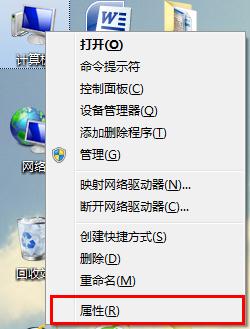
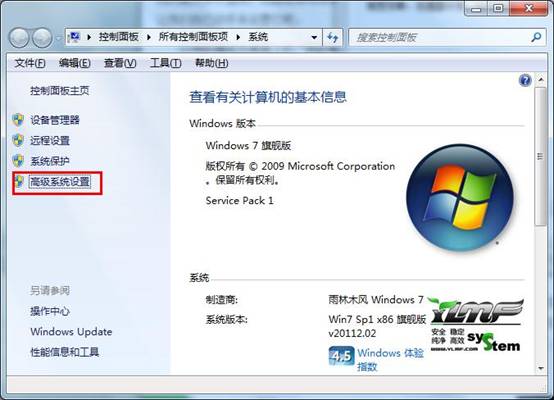
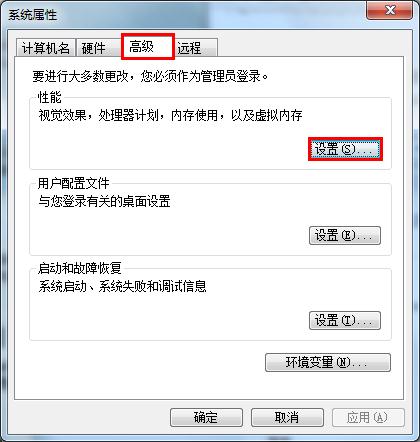
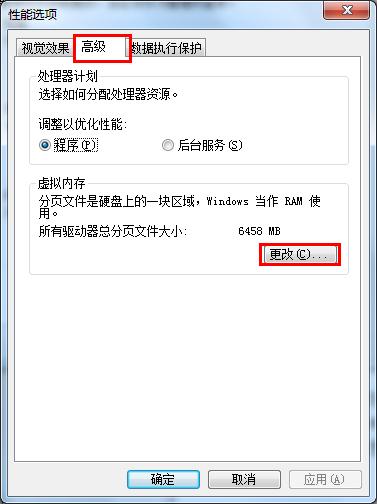
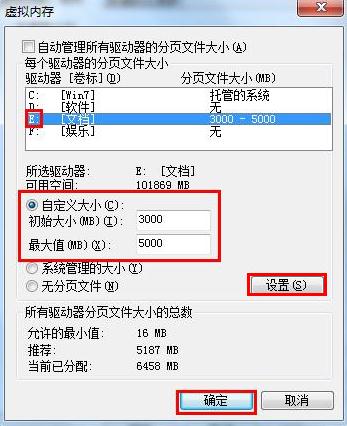
固定大小避免分頁檔動態擴縮造成碎片,提升存取效能。
Win7 搜尋關鍵字找不到檔案?通配符 * 號前綴支援中間/尾部比對,精準定位檔名片段
Win8 禁止使用者變更主題:群組原則「阻止變更主題」啟用
Windows 7 十二大貼心小功能:計算機多模式、問題步驟記錄器、可移動工作列、自訂時鐘、主題分享、跳躍清單等
Win7 安裝軟體跳出錯誤 1719?重啟 Windows Installer 服務並重新註冊 MSI.dll 徹底修復
Win7 入門工具九大功能:從新功能導覽到備份、家長控制一站式設定
Win7 善用指令快速啟動 IE9 提升效率
Windows 7 禁止 Flash Player 自動更新設定教學
Win7 旗艦版關閉 Java 自動更新功能教學(適用 32/64 位元)