Firefox 瀏覽器在 Windows 7 上修改首頁網址,只需幾步即可完成。
操作步驟
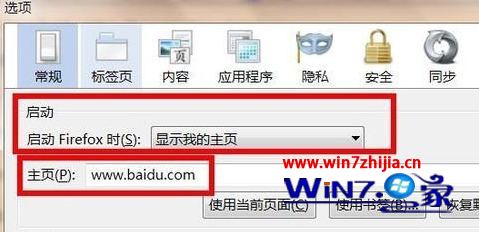
- 開啟 Firefox → 點擊左上角選單鈕 (三條線/火狐圖示) → 「選項」 (或「偏好設定」)。
- 在「一般」/「常規」索引標籤 → 「啟動」區塊 → 選擇 「顯示我的首頁」。
- 在「首頁」輸入框輸入欲設定的網址 (如
https://www.google.com),多個網址以 | 分隔。
- 點擊「確定」/關閉分頁儲存。
- 重新啟動 Firefox 驗證首頁生效。

進階:設定多個首頁分頁
在首頁輸入框輸入:https://www.google.com | https://www.youtube.com | https://github.com,啟動時會同時開啟三個分頁。
常見問題
- 首頁被惡意軟體鎖定/綁架 → 掃毒、重置 Firefox (說明 → 疑難排解資訊 → 重新整理 Firefox)。
- 企業群組原則強制首頁 → 請洽 IT 管理員。