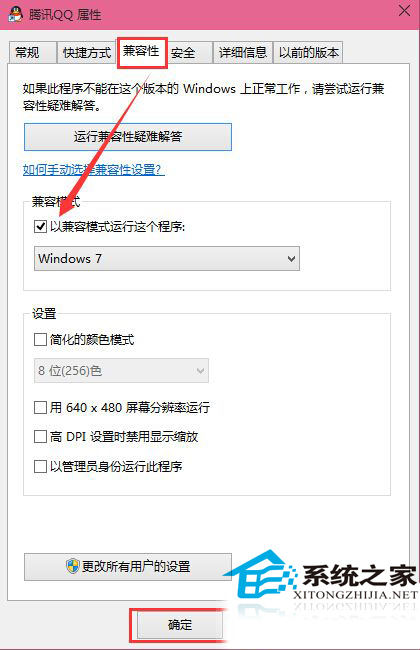
Windows 10 9926 執行 Steam 當機?可用相容模式暫時解決。
設定後 Windows 10 每次以相容模式執行該軟體。Steam 當機主因相容性不佳,測試階段常見,相容模式可暫時繞過。
Win10 10240 未激活水印無法遮擋?官方機制解析與應對建議
中國 Win10 用戶 2 天超越 Mac:StatCounter 數據詳解升級狂潮 (重複文章整合版)
Win10 無法播放音樂/影片(網頁緩衝不播、內建播放器失效)怎麼辦?乾淨開機隔離衝突
Win10 輸入法卸載不乾淨?語言設定一鍵移除殘留項目
解決 Win10 桌面圖示文字字型過大:調整「僅變更文字大小」中的圖示項目
Windows 10 快速開啟桌面捷徑目標資料夾:右鍵「開啟檔案位置」一鍵直達
Windows 10 開啟 OneNote 雲端筆記:開始功能表磚塊與所有應用程式雙入口
曝光:疑似Surface Mobile配置:5.5吋2K屏、Atom x3、4GB RAM、Surface Pen