Windows XP Windows 7 Windows 2003 Windows Vista Windows 綜合教學 Linux 系統教學
Windows 10 Windows 8 Windows 2008 Windows NT Windows Server 電腦軟體教學

Win10 查看系統啟動模式 (BIOS/UEFI) 兩大方法圖解

編輯:Win10 系統應用技巧

Windows 7 後系統支援兩種啟動模式:傳統 BIOS (Legacy) 與新式 UEFI。UEFI 支援大於 2TB 硬碟、安全開機、更快開機速度等優勢。確認目前系統採用哪種模式,有助於排除相容性問題或規劃重裝策略。

方法一:系統資訊工具 (msinfo32) - 最直觀

  1. 按 Win + R → 輸入 msinfo32 → 按 Enter。
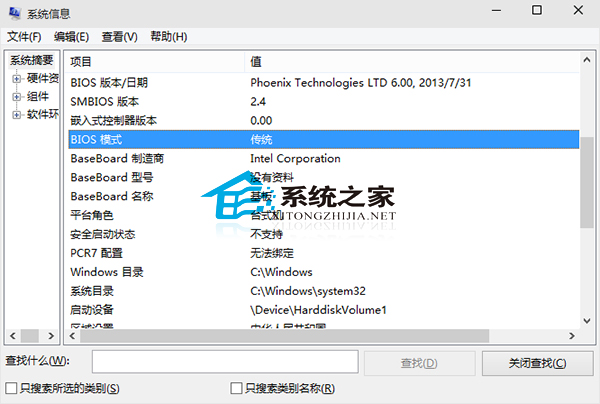
  2. 在「系統摘要」右側窗格找到 「BIOS 模式」 項目:
  • 顯示 「傳統」 → BIOS (Legacy) 模式
  • 顯示 「UEFI」 → UEFI 模式

系統資訊-BIOS模式

方法二:檢視安裝日誌 (setupact.log) - 適用無法進入系統時

  1. 以檔案總管開啟系統碟 C:\Windows\Panther\setupact.log (需管理員權限)。
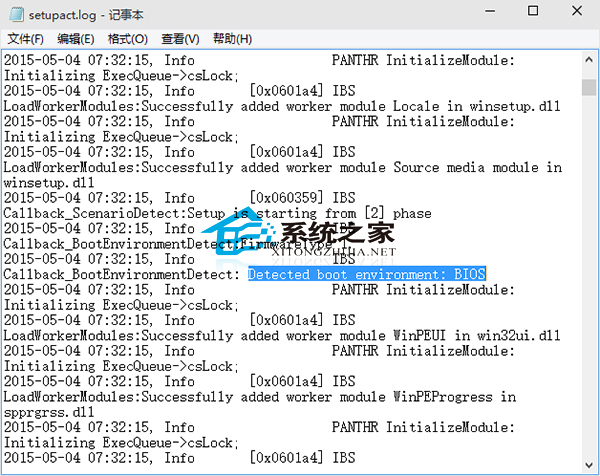
  2. 搜尋關鍵字 Detected Boot Environment。
  3. 該行後方數值:BIOS 代表傳統模式,UEFI 代表 UEFI 模式。

setupact.log-Detected Boot Environment

適用範圍: 以上兩法同樣適用於 Windows 7 / 8 / 8.1 / 10 / 11。快速檢查自家電腦啟動模式,為後續系統維護提供依據。

Copyright © Windows教程網 All Rights Reserved