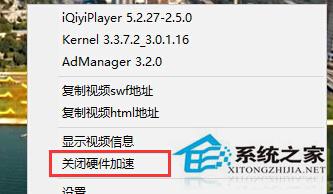
Edge 瀏覽器(及其他瀏覽器)播放網頁影片出現綠畫面、聲音正常但畫面異常,通常為顯示卡驅動程式與硬體加速衝突,或 Flash Player 設定問題。
前往 NVIDIA/AMD/Intel 官網下載安裝最新 Windows 10 版本驅動程式。Windows Update 提供的驅動可能非最新,建議官網手動安裝。
此兩方案不針對 Edge 專屬,其他瀏覽器遇綠畫面同樣適用。HTML5 影片播放器若綠畫面,請優先更新顯示卡驅動。
Win10 使用 DISM 指令查詢可升級版本:一鍵顯示目標版本資訊
Win10 應用程式商店打不開/閃退?「開啟開始選單同步法」怪招實測有效
Win10 企業版如何激活?slmgr 命令列輸入 GVLK 金鑰 + KMS 伺服器完整流程
Windows 10 設定裝置管理員自動搜尋更新驅動程式
Win10 彈出「Windows 工作的主機進程已停止運作」?輸入法衝突為主因,修復步驟
Windows 10 滑鼠操作異常「嘟嘟」聲?Win+S 關閉螢幕剪輯功能即刻解決
筆電 Win10 觸控板雙擊無反應?登錄表修改雙指點擊啟用教學
透過 WinRE 重裝 Win10:啟動安裝媒體進入恢復環境選擇修復電腦