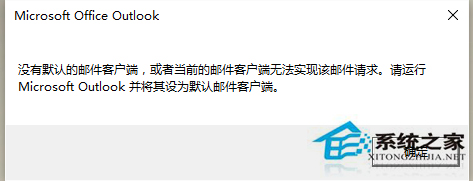
Outlook 設為開機啟動但非預設郵件用戶端,導致開機彈窗,設為預設即解決。
設定後開機不再彈出提示視窗。
Win10 不登入 Microsoft 帳號如何下載應用程式商店應用?
Win10 定時關機三大法:指令、圖形介面、第三方工具
Win10 解除登錄編輯器被鎖定:透過群組原則恢復 regedit 存取權限
Win10 更新失敗錯誤 80200056 三大解決方案:服務啟用、重命名資料夾、重裝系統
Windows 10 選擇錄音裝置(麥克風)的設定方法
Windows 10 本機帳號切換至 Microsoft 線上帳號同步設定教學
Win10 應用商店打不開、閃退?一鍵執行 wsreset 清除快取修復
Win10 滑鼠右鍵反應慢怎麼辦?