啟動程式彈出 explorer.exe 0xc0000018 錯誤,多因第三方軟體注入 DLL 衝突。
explorer.exe 0xc0000018
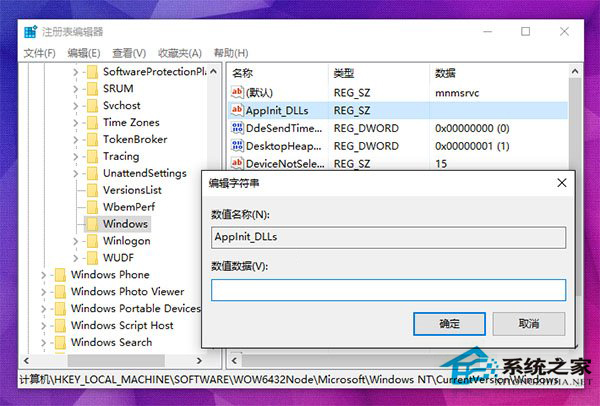
regedit
HKEY_LOCAL_MACHINE\SOFTWARE\Wow6432Node\Microsoft\Windows NT\CurrentVersion\Windows
APPINIT_DLLS
清理 APPINIT_DLLS 並排除衝突軟體通常能解決 0xc0000018。
Win10 內建壓縮/解壓縮 ZIP 功能:右鍵傳送到壓縮資料夾、右鍵全部解壓縮
Win10 清除「執行」對話框歷史指令:刪除註冊表 RunMRU 鍵值或用魔方清理大師一鍵清除
Win10 內建郵件應用無法同步網易 163 信箱?需開啟 POP3/IMAP 並使用客戶端授權碼登入
Win10 手動設定 Proxy 代理伺服器讓所有程式走代理流量
Windows 10 將檔案總管導覽窗格項目固定到「主頁」常用資料夾
Win10 快速存取資料夾順序拖曳調整:左側導覽窗與右側常用資料夾同步排序
Windows 10 預覽版 10122 常見問題與解決方案彙整
Win10 預覽版 10123 上手體驗:Edge 瀏覽器新增隱私模式、密碼管理、觸控板進階設定與鎖屏電量顯示