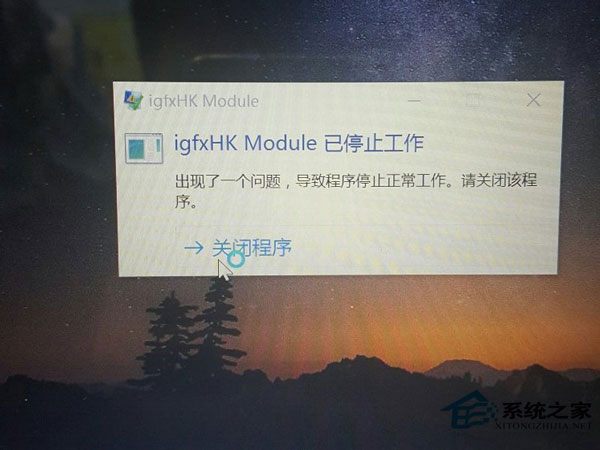
Win10 每次開機彈出「igfxhk module 已停止運作」錯誤。igfxhk module 是 Intel 顯示晶片驅動程式元件,出現此錯誤通常是顯卡驅動安裝不當所致。
igfxhk module
解除安裝 Intel 顯卡驅動,再重新安裝最新版本。
找到 C:\Windows\System32\igfxHK.exe 並刪除,即可阻止開機錯誤提示。許多使用者為雙顯卡配置,集顯驅動停止運作不會造成直接影響,依照上述操作即可消除彈窗。
C:\Windows\System32\igfxHK.exe
Win10 微軟帳號安全進階:建立與使用「復原代碼」找回帳號控制權
Win10 桌面圖示更換教學:找回 Win7/Win8 經典圖示風格
Win10 10547 版本頻繁藍畫面重開機?關閉 Windows Defender 開機掃描與驅動簽名強制
Windows 10 「照片」應用啟用自動增強:一鍵改善曝光、對比、色彩
Win10 手機 10080 完整升級過程實錄:從下載到安裝約 2 小時,新增 5 款支援機型
Win10 檢測未簽名驅動程式(sigverif 工具)
Win10 更新後瀏覽器無法上網?一行指令 netsh winsock reset 重置網路堆疊即刻修復
微軟向 Win7/8 用戶推送 Win10 免費升級預約彈窗:預約後等待正式版下載安裝