Windows XP Windows 7 Windows 2003 Windows Vista Windows 綜合教學 Linux 系統教學
Windows 10 Windows 8 Windows 2008 Windows NT Windows Server 電腦軟體教學

Win10 建立超大空白檔案佔用磁碟空間:fsutil 指令教學

編輯:Win10 系統應用技巧

需快速建立指定大小空白檔案 (測試磁碟速度、佔位、模擬大檔案傳輸),可用內建 fsutil 指令秒級完成。

指令語法:

fsutil file createnew <檔案完整路徑> <位元組數>

範例:在 D 盤建立 2GB 檔案

fsutil file createnew D:\Test_2GB.dat 2147483648

位元組換算: 1 GB = 1,073,741,824 位元組 (1024³)。

操作步驟:

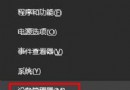
  1. Win + X → 「命令提示字元 (系統管理員)」 (或 PowerShell 管理員)。
  2. 輸入上述指令按 Enter,顯示 檔案 D:\Test_2GB.dat 已建立 即成功。
  3. 檔案為二進位零填充,無實際資料,開啟會顯示空白/損毀,僅供佔用空間或效能測試用途。

注意:目標磁碟必須為 NTFS 格式,FAT32 單檔限制 4GB 無法建立更大檔案。

Copyright © Windows教程網 All Rights Reserved